Nokia Symbian^3 First Generation Update for Belle Refresh Rumor

Posted by Boffill Tuesday, January 8, 2013

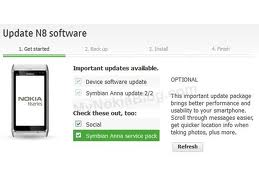
I was a bit surprise about what I’ve read at MyNokiaBlog about this new update for the first generation of Symbian^3 Devices. This is good news for all N8 users and also the C7 and Nokia N97 phone users for this update could be rolled out earlier this year. The update firmware has a version number of 111.050.0003 but there’s no changelog available yet. 
Nokia N8 Update


The main source of this rumor is Smartphonepro.ru who was also the same person to leak the earlier updates for Nokia N8. What we can expect for this update are fixes on some bugs to the earlier versions. It really surprised me knowing that Nokia is shutting down the Symbian platform. I can’t wait for the Official Firmware and the Custom Firmware to be available.

How to Save Battery of Mobile Phone

Posted by Boffill Thursday, January 3, 2013

Battery life has been the most common issues when it comes to Smartphones whether it runs with Android, iOS, Symbian or Windows. You know it’s irritating when our battery runs out after 5 hours of use and worse is you are away from home to charge your phone. When I was still using my old Nokia N82, I always bring with me an extra battery anywhere I go. Chargers are not too handy to carry so I prefer an extra battery on my pocket. I’ll be giving you guys some tips on how to save the battery of your favorite gadget so you can make use the best out of it.


Turn off GPS, Bluetooth, WIFI – These three features of our Smartphone are the monster of them all. It drains our battery too fast so it’d be better for you to turn them off when not in use.

Use 2G instead of 3G network – If you’re not using mobile internet or video call, better use 2G network instead of 3G. 3G has high consumption than 2G.

Adjust screen brightness – If you’re eyes are bright enough to read your text messages, adjust the screen brightness of your gadget to lower level

Turn off widgets – I know most of us like widgets but there are some nuisance widgets that are installed in our Smartphone that we sometimes ignore. Widgets runs in the background even if you’re phone are in lock mode and sometimes use an Internet connection which will surely drain your battery faster.

Other options that you have to turn off to save battery are vibration, notification tone and key tone


I hope these simple tips can help you optimize your battery consumption. If you have suggestions, please post a comment below so I could include it in my post.

Nokia Symbian on Android and iPhone

Posted by Boffill Thursday, December 27, 2012

Many Nokia Symbian phone users are not aware how powerful their mobile phones are.  I have been a Nokia Symbian phone user since 2003 when my brother gave me his old Nokia 3650 phone. During that time, I became obsessed on Nokia Symbian phones. The user friendly experience is great and also its functions. I researched online on how to make use of all the possibilities Nokia can gave me and it didn’t failed me. Lots of applications are available online from Video player up to Photo Editor. Social Networking sites are not yet on its limelight back then so most of the applications are only for offline functions. My favorite application before was the SMS Machine where you have an auto-reply on your mobile phone. So if you’re busy doing something, you can let your phone send a reply in every text message you receive to inform the recipient that you are busy or sleeping. Symbian platform have evolved from Symbian S60v1 then theres Symbian S60v2 then the 3rd Edition up to 5th Edition. Now, the most recent version for Symbian is the Symbian S^3 FP2 that runs on Nokia 700, 701 and Nokia 808 Pureview.

Everytime there’s a new Nokia Symbian phone coming out of the market; I always make sure that I am able to test it from a Nokia Store downtown. I always try it myself and see the latest improvement made by Nokia. I haven’t owned a lot of Nokia Symbian phones. I was only limited to Nokia 3650 then the Nokia 6630, next is the Nokia N82 and the last and my latest Nokia phone is the Nokia N8. Some of my friends don’t really know how powerful my Nokia N8 is compared to their Android power mobile phones. The body is awesome slim for me. It fits on my palm so beautifully whenever I use it. The 12MP camera is so awesome.

When I buy a new phone, I always check the camera and also if it has a built in a-GPS. That’s the two most important functions I always check on a new Nokia Symbian Phone. I could still remember when I was at Cebu having a vacation and I was roaming the downtown area until I got lost. I was so shy to ask for the way back to my mother’s workplace until I remember that I have installed Garmin Mobile XT on my phone. I checked the route and followed the built-in voice prompt of Garmin Mobile XT until I was able to get myself back at my mother’s workplace. That made me loved my Nokia phone so much because it saved my day back then.

For me, I don’t agree to what others say that Android is the most powerful platform today. I haven’t seen a Garmin Mobile XT installed on an Android phone. If we’ll talk about camera, Nokia has created the most powerful cameraphone in the world, the Nokia 808 Pureview. Yes it’s true that Google Play can give you a lot of applications for your Android phone but the problem is you’ll have to try first all the crappy applications on Google Play before you can get yourself to the real software you wanted. On gaming, I’d still go for Nokia; they have HD graphics and 3d support. Nokia supports Bluetooth 3.0 and NFC connection. I think Nokia was the original when it comes to NFC technology; Samsung just copied it and then put it on Samsung S3.

Android and iPhone has taken over that’s why Nokia’s Symbian has been out of the market. Some people wanted to buy Android and iPhone because of their social status. Yes, there are a lot of powerful mobile phones currently out on the market but some people who were using them are not wise enough to use all the phone’s functionalities. Yes, sometimes I envy some of the new mobile phones on the market like the Samsung S3 or the iPhone 4s but I don’t see any difference when using Nokia’s Symbian phone. Just to inform everyone that I was able to use those mobile phones so I could compare. I personally don’t like the idea of Nokia giving up the Symbian platform. Now they are focused on Windows mobile. Based on my observation, Symbian platform brought Nokia to the top of them all when iPhone and Android was still on their early period. Nokia have made a very big mistake giving up Symbian. They should’ve developed it more so people would continue patronizing them. But no matter what, I’d still stick to Symbian. I have no plans of switching to Android or iPhone not until they beat Symbian based on my own specification. 

Alternative for Instagram on Android and iOS

Posted by Boffill Thursday, December 20, 2012

Instagram have recently spooked plenty of its users because of the changes on their terms of services. I don't own an Android or iOS powered devices and I haven't read Instagram's changes on their terms of service. But for the sake of the people who wanted to use a different service with filters and photo editing options, I am going to list some of the available applications online that you guys can install on your devices as an alternative to Instagram. For the information of everybody, Kevin Systrom, the chief executive and co-founder of Instagram announced that users still own the rights of their photos and the photos itself, users will have the same amount of privacy they experienced even before the terms of service has been change and he made sure that the photos uploaded by the users on Instagram will not be seen in any advertisement. The new agreement will take effect on January 16, 2013.


Before you shift to a different service, I suggest you make a backup of your photos first by downloading them or checking on Instaport or Instarchive. Both services link to the user's Instagram account and will be giving them an option to download a compact file of their photos.

A lot of services are available online that provide the same aspect as Instagram. Yahoo's Flickr can let you share your photos to your close network and add filter on it. Google's Snapseed has a broad editing options that includes filter before you can share it to Google+, Twitter and Facebook. Hipstamatic, Pixlr-o-matic and Camera+ are available online and can be used to both iOS and Android devices. The latter 3 are all independent application and has an Instagram aspect. For all Nokia Symbian users, since the platform is  dying, these applications won't be available for download but still, we can have an Instagram-like application installed in our mobile phone, it's called Molome. Molome is also available for iOS, Blackberry, Android, Windows and Symbian.

 Just to inform you all that if you would delete your Instagram account, there's no way for you to reactivate it meaning all your connections and photos will be gone.

MOLOME­™ Shoot. Share. Badged. Play. Instagram for Symbian Phones

Posted by Boffill Wednesday, December 14, 2011

Right now, I’m getting addicted to this new installed application on my Nokia N8, its called Molome. Molome is an instagram application for your Symbian mobile phone (Also available for Android and Blackberry OS). If you’re an iPhone user, you should be familiar with instagram and for those who don’t know what instagram is, you take a snap, add filter on it and share it on your friends. Its like a Lomography for your Nokia phone. Filters available are Normal, Auto Level, Vignette, Black Border, Viridescent, Crossy, Purlo, Vintage, SmartBlue, GentleArt, Sunset and a whole lot more! You can automatically share your photos to your Facebook and Twitter account. Also, before I forgot, Molome is free from Ovi Store. So better check this application now and be one of us! Check out this video below to know more about Molome


Comparing Symbian Phone to Windows Mobile

Posted by Boffill Sunday, May 15, 2011
Shifting from Symbian to Windows Mobile for me is a bit hard. Last February, I bought a new phone, the Samsung B7300 Omnialite and was happy about it during the first few days. It was my first time owning a Windows Mobile phone and I’m on the process of familiarizing it. What I like about the phone is that it has similar features with my old N82 (Rest in Peace) but the problem is I don’t have lots of choices when it comes to applications. Compared to Symbian mobile phones, you can easily find an application that suits your needs. Well, important features for me are GPS applications, Wifi applications, Dictionaries, Photo enhancers, SMS managers and Music players. I got Garmin Mobile XT installed in my Samsung B7300 Omnialite and Dictionaries too and that made me feel satisfied about it. The only problem that I have with my Samsung Omnialite is that I can’t find a very nice application for my SMS’s and a Music Player too. I have choices online like the S2P (Slide2Play), an iPhone like music player but the problem is when you use it to play music for a few minutes, the sound of the phone will disappear and it will be busted. I can’t get to play sound anymore on my phone and that sucks. Good thing it restored its vocal chords after a few restarts. Also, the phone’s headset input is a mini-USB compared to my old N82 that has a standard 3.5mm jack. With the 3.5mm jack, you can use high end headsets and also use your phone as a home theater. So now, I’m planning of selling this new phone and will shift back to Nokia Symbian phone probably an N8. That’s gonna take time but I will surely buy that phone a few months from now.

Trixcell: Magic Tricks On Your Mobile Phone

Posted by Boffill Friday, September 24, 2010

I’m pretty sure that most of us are being entertained by magic tricks and since I like mobile phones, I’d like to share to you all some cool applications that can make you a quasi-psychic. Imagine guessing the hand picked card of your friend or bending the spoon thru your psychokinetic. Well, those are just few of the applications that I have just recently discovered. I’ve been to Symbian world since the dawn of the Nokia 7650 but I have not gotten any information about these cool applications since today. These applications are pretty cool if you want to impress your friends or just to entertain them with some cool hi-tech magic tricks. Here’s one of the video that you might want to watch and for all their video list, check out their Youtube page or their website.

Network Switcher for Symbian Mobile Phones

Posted by Boffill Tuesday, December 22, 2009


Application-button for cyclic switching between network mode (Dual mode, UMTS, GSM). Choice modes for switching, is carried out at the first application launch.

This application is only applicable for Symbian 9.2 and up!

Download Here
-------------

-------------

Fingertip Access Ultimate SMS v.2.9.1 S60v3 S60v5 SymbianOS9.x Unsigned

Posted by Boffill Monday, July 20, 2009


Ultimate SMS satisfies all your SMS sending/receiving needs. It keeps all your SMS messages private and safe on your phone. It schedules automatic SMS sending for you. It filters out unwanted SMS by senders and contents you specify. It notifies you of new incoming SMS using customized alert tones for different phone numbers / contacts of your choice. It also can send encrypted SMS to people in a list of you own. It lets you create template SMS and assign hotkeys to those templates so that you send a predefined SMS by simply pressing some keys on your phone screen. It groups all your messages into conversation thread based on senders and receivers so that you can view messages in context. It also reminds you of unread SMS periodically. It generates monthly SMS usage report for you.


With Ultimate SMS, you can also export all your incoming and outgoing SMS on your phone to a text file. All your incoming and outgoing messages are encrypted inside some internal database, and no body, no other applications can access those messages.

New in Version 2.9

* Schedule message sending directly from message editing screen without the need to create a template first.
* Bug fix related to tone playing.
* Bug fix related to grouping messages into conversation.
* Bug fix related to editing weekly and daily schedule.
* bug fix related to auto reply/forward weekly schedule

DOWNLOAD HERE!
-------------

-------------

Star WebGate Advanced Blocker v2.10.204 S60v3 SymbianOS9.x Unsigned

Posted by Boffill Thursday, July 16, 2009
WebGate Advanced Blocker v2.10.204
Requirements: S60v3 SymbianOS9.x
Overview: Advanced Blocker is an all-in-one solution to help you filter unwanted voice calls, video calls, text messages, MMS and WAP Push messages.

You no longer need to turn off your phone just to avoid interruptions – just enable Advanced Blocker and leave it to the software to filter unwanted and unimportant calls and messages while you enjoy your privacy.


Key features:
· Silent instant reject of all blacklisted numbers, number patterns and text rules
· Auto-start mode - option to automatically start-up AB after phone restart
· Blocking of fixed numbers or groups of numbers (wildcard * number filters)
· Discreet activity indicator on the phone’s stand-by screen
· Various contact import options – import from the phone’s log, from phone’s contact book, manual import
· Blocked history log for detailed history of filtered events
· Visual indicators providing instant overview of all new blocked events in the blacklist rules main screen
· Blocked messages can be easily viewed and restored
· Full reject entry log with details screen for each blocked event
· Customizable reject options for blacklisted contacts – you can select what kind of events to accept or reject from each number – calls, SMS, MMS, WAP push messages.

How does it work?
· Create a blacklist rule: to block certain contacts from calling/texting you, you just need to import them in the application. You can import contacts from phonebook, from the phone log and manually. Hidden callers can also be blocked!
· Visual indicator on the stand-by screen monitors AB’s activity and shows you if there are new blocked calls/messages.
· Incoming calls (voice and video) are blocked with a busy tone. Messages (text messages, MMS and WAP push messages) are silently filtered with no sound or light indication.
· Blocked History log shows you all new blocked events.
· Details of each rejected event are logged; blocked messages can be read and restored.


Download Here

-------------

-------------

Devicescape Easy Wi-Fi v3.0

Posted by Boffill
Devicescape Easy Wi-Fi v3.0
Requirements: S60v3 S60v5 SymbianOS9.x
Overview: Devicescape enables your smartphone to automatically connect to Wi-Fi hotspots and home networks without having to start your browser, enter usernames and passwords, or configure security settings.


Just power on your device and you'll be surfing the Internet or downloading e-mail in mere seconds. Support for over 160,000 paid and free hotspots around the world. Makes it simple to securely share your home Wi-Fi network with friends, and gain easy access to their networks as well.

Note:
The Devicescape client automatically logs you in to your selected Wi-Fi hotpots. However, on some Nokia phone models, when launching a web browser, you may be prompted to login. This is unnecessary. You can proceed to your desired page without re-entering your credentials or maneuvering log in screens. This is a known issue that we are working to address.

What's New:
S60 registration landing page shows up even after user chooses not to register


Download Here

-------------

-------------

Nokia Photo Browser

Posted by Boffill Tuesday, April 28, 2009
Nokia Photo Browser

Browse your photos with stunning 3D effects


Nokia Photo Browser is an experimental photo browser that makes your viewing experience quick and fun:

* Pleasing visual effects
* Intuitive touch UI
* Magnifying glass
* Face browsing

Compatibility and system requirements

Works well on Nokia devices based on S60 5th edition, S60 3rd Edition Feature Pack 1, and S60 3rd Edition Feature Pack 2. The touch interface is only available with the S60 5th Edition including Nokia 5800 XpressMusic and N97.

Popular questions and problems:
1. Who in the forum are Nokia Photo Browser (NPB) team?

hokkane4, juhakaup, and nkaneko are the developers responding in this forum. Our posts have the blue "staff" emblem attached.
2. What is Photo Browser trying to achieve

We believe photo viewing should be a fun and pleasure

We'd like to see you launching NPB just to kill some time or to relax
We'd like to see you showing your photos to your friends using NPB
We'd like to see you taking more photos because you want to view them with NPB
3. "Not compatiple" warning appears while the installation

Please don't worry and just proceed with your installation. It will work fine. We'll try to fix it at some point in the future releases.
4. "Expired certificate" installation error for 5800 XpressMusic

Unfortunately, we cannot provide good solution to this as Photo Browser is not a part of the problem. You can find the latest updates on this problem in the following forum thread.

http://betalabs.nokia.com/forum/topic/1474

One of the solutions recommened in the thread is to execute the factory reset. Please be confirmed what will happen before you commit. It will really erase and reset.
5. Slow image loading, gray boxes, and blurry pictures

Please allow a few seconds for each picture to generate a thumbnail for the first time. While the thumbnail is not ready, Photo Browser shows either gray box or low resolution image (looks blurry in the single image view). Once generated, the picture will load very quickly from the next time.

The fastest way of getting thumbnail generated is to launch Photo Browser and just leave it for a while. Moving the grid causes CPU to be spent for rendering therefore delaying the generation to finish.
6. N96 takes forever to load images

We've been reported by some patient users that only a few images are loaded after 20 minutes. Unfortunately, we cannot make commitment to solve this problem. It may be because of the hardware it has. It may be because of the system software. And of course, it may be NPB.

We very much appreciate your feedbacks on how it works with the individual product. But please also understand that we cannot provide good support for every device model here in the Beta labs.
7. Menus, dialogue boxes, image information appear in the side way

It is definitely not the design intention. But we just chose not to delay the release trying to fix it. We'll try to fix it at some point in the future releases.
8. It's missing xxx function that is in the Gallery

Your suggestions for new functions are most appreciated. That's why we're making the releases in the Beta labs.

Having said that, please also be reminded that we're not exactly trying to create the replacement for the Gallery application, which is useful for general many purposes. Photo Browser is the experiment having focus on exploring how photo-viewing can create an exciting user experience.

Of course, this doesn't mean that Photo Browser should be strictly limited to looking at pictures. If it is fun and starts continuously from photo viewing, that means a great idea.

Please take this oppurtunity to read the topic 2 above as well.

9. Better zoom quality, view-by-group, and Bluetooth send

They have been popular request. And we have some ideas under trials. Hopefully, we can make them available at some point in future releases.


Select the correct version to download:

All S60 5th Edition devices
S60 3rd Edition FP2 devices with accelerometer
Download (SIS 1.15 MB)

* Tested with 5800 XpressMusic, N97, and N79.
* Should work with N86 8MP, E66, E75, 6720 classic, 5730 XpressMusic, E55, N85, N96-3, 6210 Navigator, and N96.
* May not be able to achieve reasonable performance with N96 and N96-3.

All S60 3rd Edition FP1 devices
S60 3rd Edition FP2 devices without accelerometer
Download (SIS 1.15 MB)

* Tested with 5630 XpressMusic, E71, N82, N95 8GB, and N95.
* Should work with 6710 Navigator, 5320 XpressMusic, 6650, 6220 classic, N78, 6124 classic, E63, E51, N95-3 NAM, N81, 6121 classic N81 8GB, 6120 classic, 6110 Navigator, 5700 XpressMusic, N76, and 6290.
* Known not to work with E90 Communicator.

You will most likely encounter "not compatible" warning message. Please just proceed with your installation.
How to use:

Please allow a few seconds for each picture to generate a thumbnail for the first time. While the thumbnail is not ready, Photo Browser shows either gray box or low resolution image (looks blurry in the single image view). Once generated, the picture will load very quickly from the next time.

Touch UI

* Strokes, drags, and taps should work as you'd expect
* In the single image view:
o Long press to start the magnifier
o Double-tap will start the regular zoom
o Double-tap on a face will start the face browsing
o In the face browsing mode, a stroke will travel between faces

Keys

* Press hang-up key to exit the Photo Browser
* Press '0' or space to rotate (Only for devices w/o accelerometer)
* C-key or back space to delete the image
* In the single image view, '*' to zoom-in, '#' to zoom-out
* Navi key and soft menu should work as you'd expect

Images are loaded from memory card(E:\Images), F-drive(F:\Images\) and C-drive(C:\Data\Images\).

-------------

-------------

Nokia Magnifier

Posted by Boffill Monday, March 23, 2009

Clarity is just a click away

Nokia Magnifier application utilizes the existing camera functionality on your Nokia S60 phone. It can be used to improve readability in every-day life situations such as reading "fine print". Anyone who has difficulty seeing "fine print" or small objects can benefit from using this application readily available on their S60 phone. Nokia Magnifier has a built in stabilizer to reduce the effects of a shaky hand and negative filter enabling users to switch from light to dark backgrounds improving readability. By using the existing camera technology, users can also snap a picture of the enhanced image for later reference.

Compatibility and system requirements


Tested with the latest SW versions:

* Works on: N96, N95, N95 8GB, N82, N73, E90, E71, E66
* Does not work on: N85, N78, E65, 6220, N95, E90, N82.


DOWNLOAD HERE

-------------

-------------

ImiChat, Video Instant Messaging for Mobile Phones

Posted by Boffill Tuesday, November 25, 2008
Many of us are now addicted to IM (and if you're out-of-this-world type of person, IM is short for Instant Messaging) and there have been lots of IMs plaguing the Internet. Even in Mobile Phones, IMs are also present. There's this Slick, IM+, WirelessIRC, Fring etc. etc. Oh wait, did I mentioned ImiChat? I think not. So right now, the guy in the hotseat is ImiChat. I think its not just the typical IM for mobile phones where you just type and type those texts to send to your buddy on the other side of the world. So what great feature does this ImiChat carry apart from the usual message sending? Well, it has to do with the video chat. No Joke! Its like the usual chat on the PC where you can use your webcam but with ImiChat, you need to use the front camera of your phone. Not too boring eh? Not the usual sending of messages thru text because you can also send a voice message to your buddy. Now you can see what they're doing, where they at and everything. Not only that you can chat thru phone but you can also use it from PC to Phone. I personally tried this wonder application and its really cool. I get to see my friend from NJ using this cool application. If I'm going to rate it from 1-10 and 10 as highest, I would say 7. That's fair enough because this application is still in beta version and it needs some more development. Try it out guys and add me as your buddy. You must know my username. 


You can visit their website at http://www.imichat.com/en/


Download Here


-------------
-------------

Download Screenshot for Symbian OS (S60)

Posted by Boffill Monday, November 24, 2008


Screenshot for Symbian OS (S60 3rd Edition) version 3.01

Supported devices: Nokia 3250, N71, N73, N75, N76, N80, N81, N82, N91, N92, N93, N95, E50, E51, E60, E61, E61i, E62, E65, E70, E90.

Download Screenshot v3.01 signed - 118 KB


Screenshot for Symbian OS (S60 3rd Edition) version 3.03 - UNSIGNED

Supported devices: Nokia 3250, N71, N73, N75, N76, N80, N81, N82,
N91, N92, N93, N95, E50, E51, E60, E61, E61i, E62, E65, E70, E90.

Download Screenshot v3.03 unsigned - 118 KB

Download Screenshot v3.03 unsigned with old icon for N82 - 118 KB

Screenshot for Symbian OS (S60 1st/2nd Edition) version 2.50

Supported devices: Nokia 3230, 3600, 3620, 3650, 3660, 6260, 6600, 6630, 6670, 6680, 6681, 6682, 7610, 7650, N70, N72, N90, N-Gage, N-Gage QD.

Download Screenshot v2.50 - 191 KB


-------------

-------------

Sleep Timer for Default Nokia Music Player and Radio

Posted by Boffill Monday, October 20, 2008


Do you listen music a lot and fell asleep not knowing your music player is still running and might drain your battery?
Well this is an ideal app for you, set timer 15, 30, 60 minutes or enter manualy the time on when the player will stop..


---------------------------------------------------------------------------------
This program is for the person who likes to listen to music while getting sleep, and not have to worry about the music player running all night, if he or she falls asleep. Simply open the program, enter the amount of hours you wish the program to wait until turning off, Music Player and Radio will close at the time we set .


******* New in this version **************

Now the application comes with two modules

you can choose any module ,


keypress : this module uses the keypress module , this will simulate the keypress

and this will close the music player as you manually closes ,

* This module is more stable than the appswitch module , because some times you will get 'General System Error' and you may need to restart your mobile

**Note you need to install keypress and misty module for working this application


** recommended module : keypress

appswitch: sleep music v0.6 uses this module

* this module will work without keypress and misty module


Inactive Sensor

* apllication can now sense the inactive use of your mobile

* If the user does not use the phone for a specific peroid of time then the application will automatically close the music player

* you can select various inactivity sense time

Features

* Timer presets available for 15 , 30 and 60 min

* Also users can enter the time manually

* You can close either Music Player or Radio


****************************************************************

Installation Instructions

****************************************************************
**Python must be installed in your mobile

1. Install "sleepmusicv08.sis" sis file to your phone (dont have to sign the application)

2. Sign the attached "keypress102_unsigned_dev_certfree.SIS" sis file

3. Sign the attached "appswitch103_unsigned_devcertfree.SIS" sis file

4. Sign the attached "misty193_unsigned.SIS" sis file

5. Install the signed files in your phone


DOWNLOAD HERE
-------------

-------------

Install any unsigned apps to your Nokia phone

Posted by Boffill Wednesday, August 27, 2008
Download these FILES first.

The 4 files needed are in this zip.

STEP 1:

Install Y Browser on your phone.

STEP 2:

Install HelloCarbide.sisx.

STEP 3:

Connect Your phone using data transfer mode or PC Suite (via file manager) and copy the other 2 files (installer.exe and CProfDriver_SISX.ldd) to a directory somewhere on the phone (remember where!) I copied mine to E:\Hack

STEP 4: - READ CAREFULLY!!!

Open up Y-Browser
Hit the Menu key (so Y-Browser is still running in the background)
Run HelloCarbide from your applications folder.
Click options >> Menu1
--it will say-> Done....probably
Then click Yes
Go back to Y-Browser
Copy the 2 files mentioned in Step 3 to C:\SYS\BIN

Note: If you accidently exit Y-Browser before you have copied the files, you will have to turn your phone off and back on and repeat step 4.

STEP 5:

Once the 2 files are in the SYS\BIN folder, you can turn your phone off and back on and Voila! You will now be able to install unsigned apps like RotateMe, etc.


-------------

Guardian Mobile Security System

Posted by Boffill Monday, August 4, 2008


One of the coolest and most reliable application that I have installed on my phone is Guardian. It is an anti-theft application for your symbian application. You can control your phone remotely. After you have installed it on your phone, you need to change it settings to your desired settings. You put a cellphone number where you will be receiving the notification message once your phone is stolen. You can put also put a secret code that could lock your phone and other applications that you want to be locked. On the 2nd Edition phones version of Guardian, it has an anti-reformat support and auto-hide of icon support. But on the 3rd Edition, Marco Bellino (author of the application) decided to remove those two great features because you can actually use this application for spying tool and also because of F-Secure's request.

Once your phone is stolen, you can control your phone remotely by sending some set of commands that is provided from Guardian's website. You can delete all the data on your phone like your messages, images, videos etc. so that all your personal information will be kept secret. Sending a message to the theft can also be tricky because you can send a message to your phone without a trace on your phone number.

I recommend this application to the people who really treasure their mobile phones. It would be better to spend a dime for this security system than losing your expensive phone in just a minute.


Visit their website here
-------------

-------------

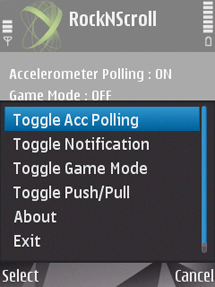
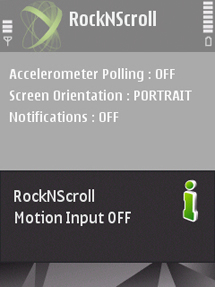
RockNScroll - Another accelerometer application for your Nokia Mobile Phone

Posted by Boffill Friday, July 11, 2008


What the Application is about

Accelerometer technology is currently amazing most of the users of current Nseries phones. The amount of available new concepts and new applications isn t stopping.
The most famous developer of accelerometer using applications, Samir, has started the wave of accelerometer application with rotateMe , a wave which didn t stop till now and won t stop so soon.

Samir s next project was Nokmote , the first application which brought motion input to S60 devices. Nokmote was actually developed for playing games and was simply too sensitive to work satisfying for menu navigation.

Shortly after its release, a video occurred on YouTube showing an application you could mistake as a Nokmote copy. However, only a little deeper glance showed that RockNScroll developed by the world s leading motion input enterprise, Keynetik, is everything else than that.

RockNScroll is a single sensor based application providing motion input to latest Nseries phones like the N82, N95, N95 8GB and also the coming N96. That means you can control your phone only with movements without pressing any key, providing access to nearly all functions of an S60 phone.

The application is not only thought for menu navigation; it offers also a gaming mode bringing new gaming experiences in a similar way like Nokmote. Of course this is just a little extract of what this powerful software can do. Read on to discover more about its other features.

RockNScroll gives you the possibility to navigate in the menus of your accelerometer supporting Nokia device by using different gestures. With little flicks of your wrist in the corresponding direction, you are able to move the cursor right and left, up and down.

Menu navigation consists of course not only of moving the cursor. RockNScroll supports a Push gesture which is used to confirm a selection and a Pull gesture for back or exit command. As you can see, Keynetik thought about all necessary possibilities to make menu navigation as comfortable as possible. It didn t work with Nokmote like this, not only because of the high sensitivity, but also because of the lack of a Back gesture .

While navigating, you can hold the device in nearly every angle you like; the application adjusts itself to the phone s position. Also an advantage in comparison to Nokmote which worked only in a certain angle.

1. Up/Down/Left/Right tilt gestures to emulate single press on navigation pad. Will be operable in any orientation (portrait/landscape) and any position (horizontal/vertical/in between) as shown in the video. Good for menus and some games.
2. Some noise filtering. It won't be totally immune to interference, but it will be usable while in motion (walking, driving, etc.)
3. Adjustable sensitivity levels
4. Scroll mode: Tilt (same as 1) and hold for scrolling to emulate press and hold on nav pad. Good for phone books, media player, etc.
5. Game mode: Orientation and position specific based on device tilt and angle. Meaning you will have to hold in horizontally at 0 angle in landscape orientation. Good for at home gaming.
6. Screen rotation: Rotating device from portrait to landscape.


Download RockNScroll Here
AccelerometerPlugin.sis

-------------

-------------
Nokia Barcode Reader

Posted by Boffill Tuesday, July 1, 2008
Have you noticed that pre-installed Barcode reader of your Nokia N82 or any other phones that has a BarCode Reader ? This barcode reader doesn't really read the barcode that we commonly use when we purchase a grocery item in the market but instead, its use is to read the barcode that Nokia and any other mobile phone has. A sample of Nokia's Barcode is the one provided below.


For you to read the message behind that code, all you need to do is to open your Barcode Reader > Open your Camera > Scan Code > View the barcode on your screen > Enjoy!


Don't you have a Barcode reader? Get it at http://mobilecodes.nokia.com/scan.htm
And for you to create your own Barcode, try to visit http://mobilecodes.nokia.com/terms.htm
-------------

-------------